 Central de Ajuda


The explanation below applies to creating QS-type Windows remote agents, intended for computers with banking software installed or for occasional customers.
If you want to create a NORMAL-type Windows remote agent, used on most computers with this operating system, click HERE to see the specific explanation.
The QS Remote can be used in two different situations: #
The first is for one-off services, ideal for customers who do not have a regular contract. In these cases, there is no need for the remote agent to stay in memory for functions such as monitoring or backup.
The second is for customers with banking software installed: you have the option to generate an agent with the QS option.
In both cases, every time the customer needs your help, they will need to open the program. It has the advantage of registering itself automatically like the normal remote agent, but it will stay inactive in your Master Control panel until the user opens the program.
The only detail in this case is that, because it does not stay active in memory, the QS remote agent has some limitations.
QS Limitations #
Remote event viewer, Backup, CFAG – closed agent circuit, VGRV, Certificates, Devices, Downloads, Firewall, Printing, Monitoring, S.M.A.R.T., Updates and URLs. It only uses first-generation video engines, with less compression
NOTE: since Quick Support is inactive most of the time, it does not receive automatic updates. So we suggest that, when using a Quick Support agent, you update the remote agent first when starting the session.
How to generate a QS Remote #
- After opening your Master Control, click Tools, at the top right.
- Then choose the Generate agent installer option.
- Some companies use more than one visual identity in their support, so choose the identity (Skin), you will use.
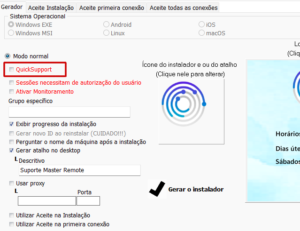
- Check the option: QuickSupport
- Optional – Select other installer options according to your company’s procedures and needs.
- Optional – Select an image for the agent icon that will appear on the customer’s machine and in the Windows system tray
- Optional – Change the description to *Support “your company name”*
- And click the OK symbol in Generate agent.
- Master Control will ask you to choose the folder where you want to save the installer. Ideally, generate it in the same folder as Master Control, which should already be in the antivirus exclusions.
- The generation progress will then be shown.
- Send the generated file to the customer, publish it on your website or in a cloud app such as BOX (free), share the link and ask them to download and run it.
- Run it to install the agent.
Once installed, the partner will automatically appear in your Master Control panel, where you can edit its identification and assign it to a group. This partner will always be inactive until the customer opens the program.
We suggest not installing and uninstalling several times in a row on the same remote computer. That ID will be blacklisted and cannot be used without clearance from Master Remote technical support.
Avoid using images with a very large file size when customizing the agent, as this may prevent it from being generated.
If you want – or need – the customer or employee to accept before access can happen, see HERE how to set up Attended Access.
⚠️ Was this article helpful? – If this article did not answer your question or you found outdated information, contact us through the support channels available in the apps, through our Support Center on WhatsApp or by phone: +55 17 2786-0640, option 4, or through your Customer Area.
⚠️ Images and data in this content are for illustration only. The appearance and information may vary depending on the version used.
Try Master Remote free for 7 days. Professional remote access with 7 integrated tools. Download Master Control →
Enjoyed the article? Check out what’s new on our WEBSITE, share the article with your friends and follow Master Remote on LinkedIn, YouTube, Instagram and Facebook. Also, explore other articles on the side and stay up to date with the latest news on customer support technology and cybersecurity.
YOU MAY ALSO BE INTERESTED IN: