 Central de Ajuda


Video option. #
If you prefer, watch the video explanation HERE.
What is an ID? #
In Master Remote software, the ID (identifier) is a unique, permanent code that precisely identifies each device or session within the remote access platform. It is essential for establishing a secure connection with multi-factor authentication between Master Control and the remote device’s agent.
One of the main differences of this identifier is its persistence: it stays the same even after the agent is uninstalled and reinstalled, or even when the device is formatted or factory reset. This ensures operational continuity, traceability and greater control in remote management.
Security #
Master Remote’s security prevents a company from registering in its Master Control the ID of a remote agent that another company installed previously, without permission or a change of provider. So the remote agent is technically owned by the company that created it and only that company can use its additional features such as backup and monitoring, among others.
There are alternatives for this, but we need to understand why your company needs to access this customer.
Access may be occasional, for technical support to a partner, or in more delicate situations, such as when replacing a system at the end customer’s request without the previous provider being aware of the process.
Two companies may also be serving the same customer at the same time — for example, one providing the management system and the other the TEF payment system. There are also cases where the reseller and the software house need to access the environment together.
Possible procedures #
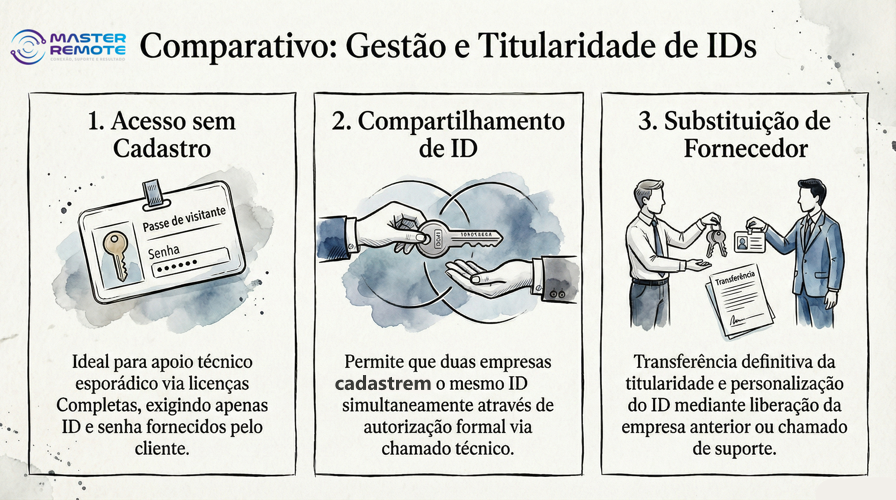
Case 1 – Access without registration – Full licenses only #
- Customers with full licenses can access devices without changing ownership, even if the remote device is not registered in their Master Control. To do so, just use the specific “Access unregistered partner” icon. It then works like simpler remote access software: the system asks only for the remote device’s ID and password, provided by the end customer, to complete the connection. Note that in this case the end customer’s consent is required, since they provide the ID and password.
Access unregistered partner icon
Case 2 – ID sharing – All license types #
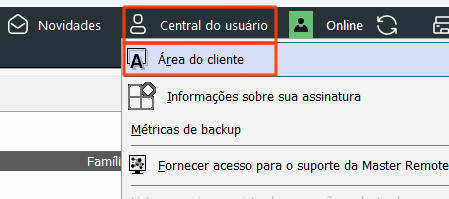
Sharing an ID is a simple process. The person responsible for the company that owns the ID must go to their Customer Area and open a support ticket under the “SUPPORT” option. In this ticket, they must authorize the other company to use the ID, allowing access to be shared.
The ticket must include:
- The list of identifiers (IDs) to be changed.
- The CNPJ or the group number of the new company these identifiers will be shared with.
Note that both the ID and the group number must be written as text in the body of the message. Images are not accepted.
Case 3 – Change of responsible company – All license types #
When the responsible company is being replaced, there are two options.
- Option 1 – The previous company releases the ID by uninstalling the remote agent and deleting the ID from its Master Control panel, or just by deleting the ID from its Master Control panel.
- Option 2 – The person responsible for the company that wants ownership of the ID must go to their Customer Area and open a support ticket under the “SUPPORT” option. In this ticket, they must provide the ID(s) and request the release of the ID ownership to their company.
The ticket must include:
- The list of identifiers (IDs) to be released;
- The company group number these identifiers will be associated with, which will become the owner of the IDs.
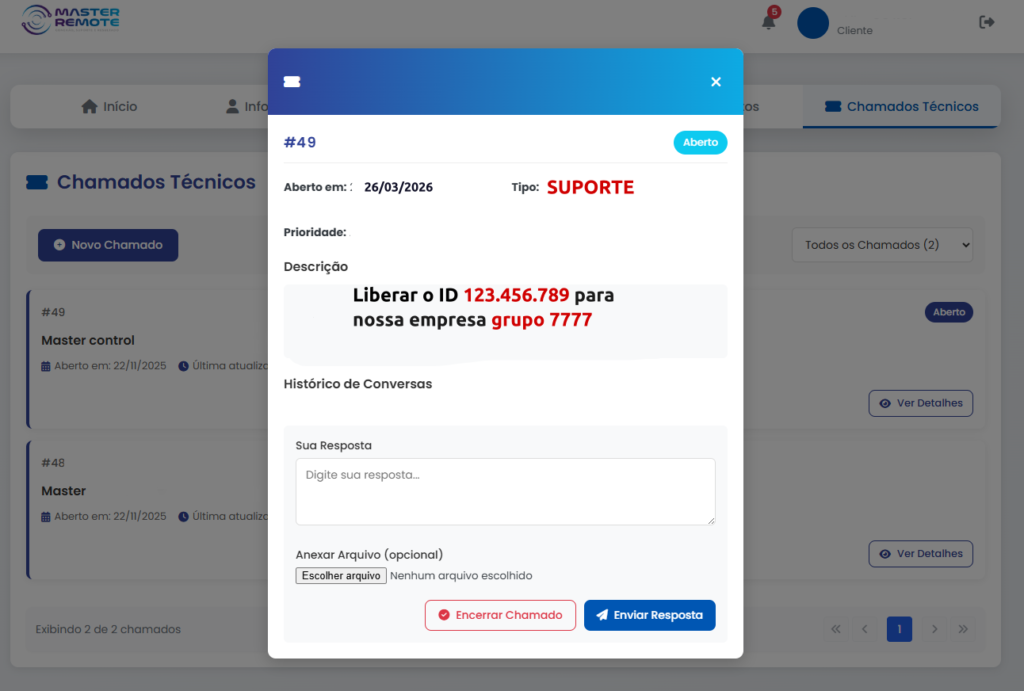
Note that the ID(s) must be written as text in the body of the message. Images are not accepted.
- Deleting an ID in the Master Control panel is done with the person icon with an X.
- The group number can be found in: USER CENTER > INFORMATION ABOUT YOUR SUBSCRIPTION, at the top right of your Master Control.
- The Customer Area can also be accessed without Master Control at: https://masterremote.com.br/cliente/acesso/login.php
- If you do not have access to your Customer Area, ask our support center for your credentials on WhatsApp at +55 17 2786-0640, option 4.
Customization #
- When the responsible company is replaced, the customization is automatically changed to the new company within 24 hours.
- For access without registration, the customization stays the same. However, the data and photo of the user from the company accessing are shown. Access records, such as logs and video, are also recorded normally.
- For ID sharing, the right to customize belongs to the company that owns the ID. The other companies involved in the sharing appear in the information panel, showing the company name, logo or photo and the agent’s name.
Try Master Remote free for 7 days. Professional remote access with 7 integrated tools. Download Master Control →
⚠️ Was this article helpful? – If this article did not answer your question or you found outdated information, contact us through the support channels available in the apps, through our Support Center on WhatsApp or by phone: +55 17 2786-0640, option 4, or through your Customer Area.
⚠️ Images and data in this content are for illustration only. The appearance and information may vary depending on the version used.
Enjoyed the article? Check out what’s new on our WEBSITE, share the article with your friends and follow Master Remote on LinkedIn, YouTube, Instagram and Facebook. Also, explore other articles on the side and stay up to date with the latest news on customer support technology and cybersecurity.
YOU MAY ALSO BE INTERESTED IN: