 Central de Ajuda


Ensuring access control and device security is a need that goes hand in hand with the convenience of modern solutions. To offer more protection, we provide an additional mechanism: setting a password for access to restricted devices. With this feature, remote connections require prior validation of the user’s password, adding an extra layer of security. Because the password is linked directly to the user registration, the system provides greater flexibility and strict control over connection authorizations for these specific devices.
How to set the password and require its use. #
- In the user registration, set the password in the Password for protected IDs field.
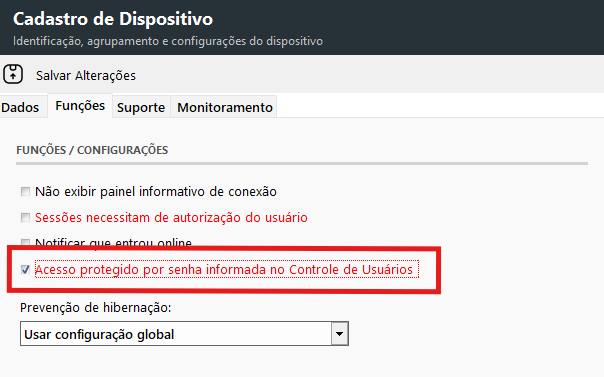
- In the customer registration, on the FUNCTIONS tab, select the Access protected by the password set in user control option.
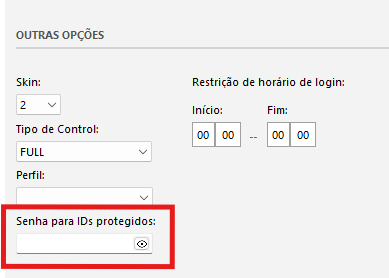
For the new rules to apply, after saving the user with the password, log out of Master Control, wait 10 seconds and log in again.
This setting is only available with full licenses.
This setting can only be seen by ADMIN users.
The password can be different for each user who will access the device. Users without a password will not have access
Try Master Remote free for 7 days. Professional remote access with 7 integrated tools. Download Master Control →
⚠️ Was this article helpful? – If this article did not answer your question or you found outdated information, contact us through the support channels available in the apps, through our Support Center on WhatsApp or by phone: +55 17 2786-0640, option 4, or through your Customer Area.
⚠️ Images and data in this content are for illustration only. The appearance and information may vary depending on the version used.
Enjoyed the article? Check out what’s new on our WEBSITE, share the article with your friends and follow Master Remote on LinkedIn, YouTube, Instagram and Facebook. Also, explore other articles on the side and stay up to date with the latest news on customer support technology and cybersecurity.
YOU MAY ALSO BE INTERESTED IN: