 Central de Ajuda


The Backup Metrics screen was developed to provide a consolidated view of backup storage usage across all devices monitored by Master Control. With it, you can follow how much of the contracted capacity is used, identify devices with higher-than-expected usage, check how storage is distributed among the protected devices and find optimization opportunities to keep usage within the quota.
This analysis lets IT administrators and managers keep the environment under control, anticipate capacity expansion needs and make sure storage resources are used efficiently. In this article, we present the main indicators available on the screen and how to interpret each one for more effective backup management.
When storage usage exceeds the contracted capacity, the Backup Metrics screen may be shown automatically at login. This alert is meant to draw attention to overuse, allowing a quick analysis of the devices responsible and helping you decide whether to optimize or expand the available capacity.
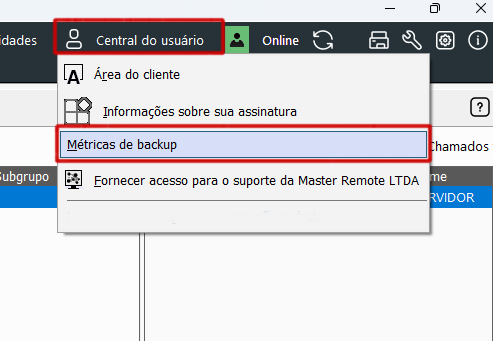
You can also open the panel from the menu:
As a demonstration, we will use an environment with 488 devices protected by backup, using 457.5 GB of storage. However, the contracted space is 210 GB, resulting in usage of 217.8% of the contracted capacity, with an excess of 247.5 GB.
If you have questions about the backup space calculations, see HERE the explanation.
If you want to know the most common mistakes when creating backup routines, find HERE the explanation.
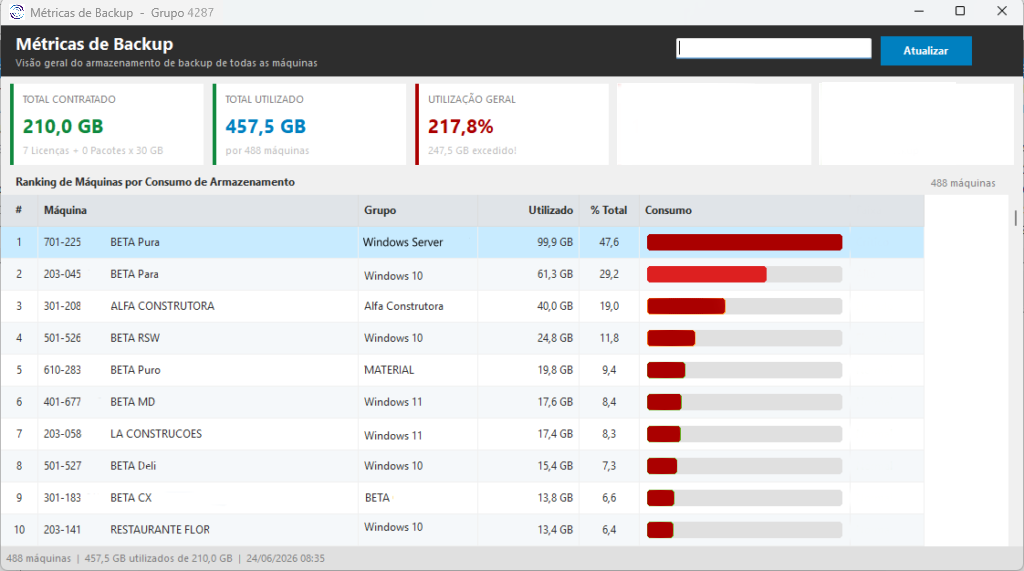
Despite the high overall usage, the distribution is quite healthy: 99.2% of the devices are in the normal usage range, showing that the excess is concentrated in a few devices.
Main Indicators #
- Total contracted: 210.0 GB
- Total used: 457.5 GB
- Protected devices: 488
- Current excess: 247.5 GB
- High-usage devices: 1 critical device
Usage Distribution #
Of the 488 monitored devices:
| Range | Count | Percentage |
|---|---|---|
| Normal (<10%) | 484 | 99.2% |
| Elevated (10-19%) | 2 | 0.4% |
| High (20-29%) | 1 | 0.2% |
| Critical (30%+) | 1 | 0.2% |
| No Backup | 0 | 0.0% |
This shows the environment has excellent backup coverage, with no unprotected devices.
Points of Attention #
1. Critical device #
In our example, a single device alone uses:
- 99.9 GB
- 47.6% of all storage used
This is the main cause of the overuse and deserves a detailed analysis to identify:
- Excessive data growth.
- Temporary folders included by mistake.
- Duplicate files.
- Longer retention than necessary.
- The need for a specific backup policy.
2. Storage concentration #
The four largest consumers represent approximately:
- 99.9 GB
- 61.3 GB
- 40.0 GB
- 24.8 GB
Totaling about 226 GB, practically all the contracted space.
This indicates that reviewing a few devices can greatly reduce total usage.
Positive Aspects #
✅ Only 4 devices are outside the normal range.
✅ The overuse is concentrated in a few devices, making it easier to fix.
✅ The usage ranking gives good visibility of the environment.
Recommendation #
The main goal should be to identify and optimize the backups of devices classified as Elevated, High and Critical before buying more storage. If the stored data is really needed for the business, we recommend increasing the contracted capacity to match current usage.
The simulated environment has excellent backup coverage and low operational risk, but it is using more than twice the contracted capacity because data is concentrated in a few specific devices. This creates a clear opportunity to optimize or resize the contracted plan.
⚠️ Was this article helpful? – If this article did not answer your question or you found outdated information, contact us through the support channels available in the apps, through our Support Center on WhatsApp or by phone: +55 17 2786-0640, option 4, or through your Customer Area.
⚠️ Images and data in this content are for illustration only. The appearance and information may vary depending on the version used.
Try Master Remote free for 7 days. Professional remote access with 7 integrated tools. Download Master Control →
Enjoyed the article? Check out what’s new on our WEBSITE, share the article with your friends and follow Master Remote on LinkedIn, YouTube, Instagram and Facebook. Also, explore other articles on the side and stay up to date with the latest news on customer support technology and cybersecurity.
YOU MAY ALSO BE INTERESTED IN: